Claude Monet Paintings Digital Papers 9: A Practical Guide for Creators
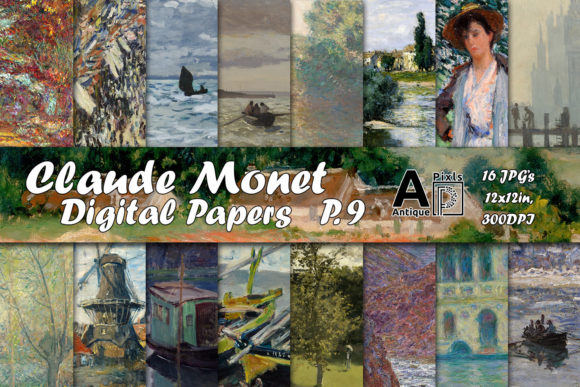
Bringing the soft light and vibrant brushstrokes of Impressionism into your modern paper crafts requires more than just a quick download. When you select Claude Monet Paintings Digital Papers 9, you are choosing a specific set of high-resolution files edited to fit the standard 12 x 12-inch digital paper template. This collection is designed specifically for junk journaling, scrapbooking, and various mixed-media projects where texture and color harmony are paramount. However, many creators approach digital assets with assumptions that can lead to disappointing results in their final physical or digital creations.
The value of this set lies not just in the artistic heritage of Oscar-Claude Monet, but in the technical preparation of the files. These 16 high-resolution JPEGs are rendered at 300 DPI, ensuring they hold up under scrutiny. Yet, simply owning the file does not guarantee a professional outcome. Understanding how these specific digital papers interact with your workflow, printing settings, and design choices is essential for avoiding common pitfalls that waste time and materials.
Avoiding Resolution and Format Missteps
One of the most frequent errors crafters make when working with digital downloads like Claude Monet Paintings Digital Papers 9 is ignoring the difference between screen resolution and print resolution. On a computer monitor, an image may look crisp even at lower quality because screens typically operate at 72 PPI (pixels per inch). However, when you move to physical media—whether for card making, printing labels, or creating birthday party decorations—the requirement jumps significantly.
If you attempt to stretch a low-resolution version of these paintings to fill a full 12 x 12-inch page, the result will be pixelated and blurry, ruining the delicate details of Monet's water lilies or landscapes. The good news is that this specific set is pre-optimized at 300 DPI. This means the pixels are dense enough to produce sharp, gallery-quality prints on standard photo paper or heavy cardstock. The mistake happens when users inadvertently resize these images in graphic software without locking aspect ratios or changing the resolution settings, effectively degrading the quality they paid for.
To avoid this, always verify the properties of your downloaded JPEG before opening it in your layout software. Ensure your canvas size matches the 12 x 12-inch dimensions exactly. If you are using these for smaller elements like tags or invites, you have the flexibility to crop them, but never upscale a portion of the image beyond its original resolution if you plan to print it large. Stick to the provided dimensions to maintain the integrity of the artwork.
Selecting the Right Paper Stock for Texture
Another overlooked detail involves the relationship between the digital image and the physical paper stock. Monet's work is famous for its visible brushwork and atmospheric depth. Printing these images on thin, glossy photo paper might capture the colors well, but it often fails to convey the tactile feeling of the original oil paintings. For junk journals and vintage collages, the texture of the paper plays a crucial role in the aesthetic.
Using standard copy paper is a common cost-saving measure that often leads to frustration. The ink tends to bleed, colors appear duller, and the paper lacks the stiffness required for decoupage or sturdy greeting cards. Conversely, using paper that is too thick can cause feeding issues in home printers. The sweet spot for Claude Monet Paintings Digital Papers 9 is usually a mid-weight cardstock (around 80-100 lb) with a slight matte or textured finish. This mimics the canvas of the original paintings and allows the ink to sit on the surface rather than soaking in, preserving the vibrancy of the blues and greens found in the series.
Before committing to a large batch for a commercial project or a complex scrapbook album, run a test print on your chosen stock. Check how the colors translate from screen to paper. You may find that your printer needs a slight color calibration adjustment to match the warmth of Monet's palette. Ignoring this step can result in a stack of unusable prints, wasting both money and resources.
Navigating the Series and Licensing
This collection is part of a multi-volume series dedicated to the works of Oscar-Claude Monet. A common misunderstanding among buyers is assuming that purchasing one volume grants access to the entire archive or that all sets contain similar subject matter. Each volume, including Claude Monet Paintings Digital Papers 9, offers a unique curation of his works. Some volumes might focus on his gardens, while others highlight his seascapes or cathedrals.
If you are building a cohesive brand for your small business or planning a themed blog post, consistency is key. Downloading random sets without checking the content can lead to a disjointed visual style. Before purchasing, take the time to visit the store and search for "Monet" to review the thumbnails of the other available volumes. This ensures that the specific mood and color palette of Set 9 align with your broader creative vision. It also prevents the redundancy of buying overlapping images across different volumes.
Furthermore, understanding the license is vital for entrepreneurs and freelancers. While these digital papers are perfect for personal use, card making, and selling finished physical goods like journals or decorated tags, there are often restrictions on reselling the raw digital files themselves. Always read the terms of use included with your purchase. Misinterpreting these rules can lead to account bans or legal complications, especially if you are scaling your craft into a full-time business.
Maximizing Versatility in Your Projects
The versatility of these 16 high-resolution files extends far beyond simple background paper. They are excellent for decoupage, where the durability of the printed image matters, and for creating vintage collages that require layering. However, a practical mistake is treating every image as a full-page background. Sometimes, cropping a specific section of a Monet painting creates a more impactful focal point for a label or an invitation tag.
For example, instead of printing a full landscape for a birthday party decoration, try isolating a cluster of flowers or a section of the sky to create a patterned border. This approach saves paper and adds a sophisticated, custom touch to your designs. When working on junk journals, consider distressing the edges of your printed sheets slightly before adhering them. This enhances the vintage feel and integrates the digital print seamlessly with other ephemera like tickets, letters, and ribbons.
Finally, do not hesitate to provide feedback. Letting the creator know in the review section how you utilized Claude Monet Paintings Digital Papers 9 helps future buyers understand the potential applications. Whether you used them for elegant wedding invites or rustic scrapbook pages, your experience contributes to the community knowledge base. By approaching these digital assets with intention, proper technical setup, and creative experimentation, you ensure that your projects reflect the timeless beauty of Monet's art without the frustration of preventable errors.