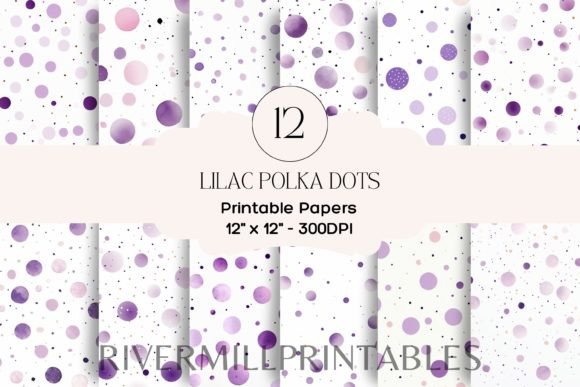
Unlocking Creative Potential with 12 Lilac Polka Dots Digital Papers
In the world of digital design, texture and pattern are often the unsung heroes that transform a flat layout into something tactile and inviting. Among the vast ocean of available assets, 12 Lilac Polka Dots Digital Papers stands out as a versatile resource for creators who appreciate subtle elegance mixed with playful charm. This collection is not merely a set of background images; it is a toolkit for consistency, branding, and aesthetic cohesion across various projects. Whether you are a seasoned graphic designer or a hobbyist looking to elevate your personal crafts, understanding how to leverage these high-resolution assets can significantly streamline your workflow.
The core appeal of this specific pack lies in its balance. Lilac is a color that straddles the line between professional softness and whimsical creativity. It is less aggressive than bright purple yet more distinctive than plain white or gray. When paired with the classic polka dot motif, the result is a timeless design element that works across generations and industries. The set contains 12 high-quality JPG images, each rendered at 300 DPI with dimensions of 12 x 12 inches (3600 x 3600 pixels). This technical specification is crucial because it ensures that the patterns remain crisp and clear, whether they are being viewed on a retina display or printed on physical cardstock.
Real-World Applications for Crafters and Makers
For the scrapbooking community, digital papers have revolutionized how memories are preserved. The 12 Lilac Polka Dots Digital Papers offer a perfect backdrop for baby albums, wedding memorabilia, or spring-themed layouts. Because the dots vary slightly in density and scale across the twelve different files, users can create depth by layering them. Imagine using a sparse, large-dot pattern for the main page background and a denser, smaller-dot variation for photo mats or journaling cards. This creates visual interest without overwhelming the photographs themselves.
Card making is another arena where these assets shine. Handmade greeting cards benefit immensely from unique backgrounds that do not look mass-produced. With these digital papers, you can print them on high-quality textured paper to create custom envelopes, liners, or the card base itself. The 300 DPI resolution ensures that when printed, the edges of the dots remain sharp, avoiding the pixelation that plagues lower-quality downloads. For those who use cutting machines like Cricut or Silhouette, these JPGs can be imported as print-then-cut elements, allowing for precise alignment of decorative layers.
Elevating Small Business Branding and Marketing
Beyond personal hobbies, small business owners, particularly those in lifestyle, beauty, or boutique sectors, can find immense value in this collection. Branding requires consistency, and having a library of on-brand background textures is essential for social media content creation. The lilac hue suggests calmness, creativity, and femininity, making it ideal for businesses targeting a female demographic. You can use these papers as backgrounds for Instagram stories, Pinterest pins, or Facebook post overlays.
Consider a local bakery launching a new line of lavender-infused pastries. Using the 12 Lilac Polka Dots Digital Papers as a backdrop for product photography adds a thematic touch that reinforces the flavor profile without needing expensive physical props. Similarly, an online retailer selling handmade jewelry can use these patterns to create cohesive packaging inserts or thank-you cards. The professional quality of the 3600 x 3600px files means they can be scaled down for web use without losing clarity, ensuring your brand looks polished on every platform.
Digital Product Creation and Print-on-Demand
For entrepreneurs in the digital product space, this set serves as a foundational building block. Many creators sell printable planners, journals, and stickers on platforms like Etsy. The polka dot patterns can be used to design divider pages, cover art, or sticker sheets. Since the files are JPGs, they are compatible with almost all design software, from Adobe Photoshop and Illustrator to free tools like Canva. This accessibility lowers the barrier to entry for new sellers who want to create professional-looking products without investing in complex vector drawing skills.
Print-on-demand services also benefit from high-resolution assets. If you are designing tote bags, phone cases, or throw pillows, the 12 x 12 inch square format is a standard starting point. While you may need to tile the image for larger products, the seamless nature of many polka dot designs makes this process straightforward. The variety within the 12-image set allows you to offer customers multiple colorway options or pattern densities, increasing the perceived value of your product listings.
Key Considerations Before You Start
While the 12 Lilac Polka Dots Digital Papers are highly versatile, there are practical considerations to keep in mind to ensure the best results. First, always check the licensing terms associated with the download. Most digital paper packs allow for both personal and commercial use, but some may have restrictions on the number of end products you can sell or require attribution. Understanding these boundaries protects your business and respects the creator’s work.
Secondly, consider the color calibration of your output device. Lilac is a nuanced color that can appear differently on various screens and printers. If you are printing for physical crafts, it is advisable to do a test print on the specific paper stock you intend to use. Some home printers may render the purple tones cooler or warmer than expected. Adjusting the brightness and contrast in your editing software before final printing can help achieve the desired softness.
Another factor is file management. With 12 high-resolution JPGs, the total file size can be significant. Organizing these assets in a dedicated folder with clear naming conventions will save time during future projects. Tagging them with keywords like "spring," "pastel," or "pattern" in your digital asset management system can make retrieval faster when you are working under a deadline.
Maximizing Versatility Through Layering
To get the most out of this set, think beyond using the papers as static backgrounds. In digital design, opacity and blending modes are powerful tools. By lowering the opacity of a lilac polka dot layer and placing it over a solid color or a photograph, you can create subtle textures that add sophistication without dominating the composition. Try using overlay or multiply blending modes to integrate the dots with underlying images, creating a cohesive look that feels custom-designed rather than templated.
Furthermore, these patterns can be masked into shapes. Instead of a full-square background, clip the polka dot pattern into text, circular frames, or custom shapes. This technique is particularly effective for creating eye-catching headers for blogs or newsletters. The contrast between the structured geometry of the dots and organic shapes can draw the viewer’s eye to key information.
Ultimately, the 12 Lilac Polka Dots Digital Papers represent more than just a download; they are a catalyst for creativity. By providing high-quality, ready-to-use assets, they remove the technical hurdles of pattern creation, allowing you to focus on the artistic and strategic aspects of your projects. Whether you are preserving memories, building a brand, or launching a new product line, these digital papers offer the reliability and aesthetic appeal needed to make your work stand out in a crowded digital landscape.