Vintage Carnival Clipart, Baby Blue: A Guide to Quality and Usability
The resurgence of vintage aesthetics in digital design has created a unique niche for creators who appreciate nostalgia mixed with modern clarity. Among the most sought-after assets are themed collections that offer both charm and technical versatility. Vintage Carnival Clipart, Baby Blue represents a specific intersection of whimsical imagery and soft, approachable color palettes. For designers, crafters, and small business owners, understanding how to properly utilize these assets can mean the difference between a professional-looking final product and a project that falls flat due to technical oversights.
While the visual appeal of carnival motifs—think Ferris wheels, striped tents, and classic game booths—is undeniable, many users overlook the technical specifications that ensure these images perform well across various mediums. This guide addresses common pitfalls when selecting and using high-resolution clipart, ensuring you maximize the value of your digital purchases.
Understanding the Technical Foundation
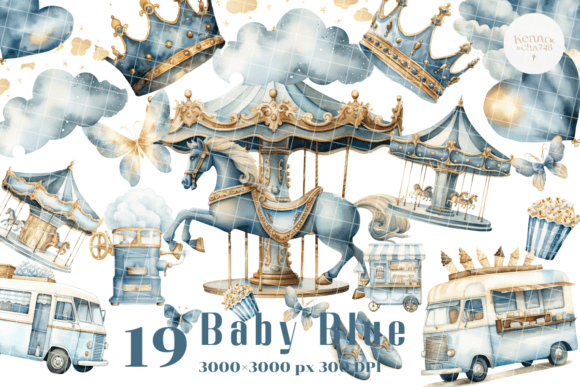
Before diving into creative applications, it is crucial to understand what constitutes a high-quality digital asset. The Vintage Carnival Clipart, Baby Blue collection typically includes 19 individual PNG images. The choice of PNG format with a transparent background is not arbitrary; it is essential for layering. Unlike JPEGs, which have a solid white or colored background, transparent PNGs allow you to place the clipart over any texture, color, or photograph without unsightly white boxes surrounding the image.
Furthermore, the resolution matters immensely. These images are provided at 300dpi (dots per inch) with dimensions of 3000×3000 px. This high resolution is critical for print projects. Many beginners mistakenly believe that an image looking sharp on a computer screen will look equally sharp when printed. This is a fundamental error. Screen resolution is typically 72dpi, while professional printing requires 300dpi. Using a low-resolution image for a physical product results in pixelation, blurriness, and a perceived lack of quality that can damage a brand’s reputation.
Common Mistakes in Digital Asset Usage
Even with high-quality files like those found in this collection, users often make avoidable errors that compromise their projects. Recognizing these issues early can save time, money, and frustration.
Ignoring Scale and Proportion
One frequent mistake is resizing images disproportionately. When you drag the corners of a clipart image in design software, it is vital to maintain the aspect ratio. Stretching a vintage carousel or a baby blue balloon horizontally or vertically distorts the illustration, making it look unprofessional. Always hold the shift key (or equivalent constraint command) while resizing to keep the proportions intact. Given the large 3000×3000 px canvas size, you have ample room to scale down without losing quality, but you should never scale up beyond the original dimensions.
Misjudging Color Harmony
The "Baby Blue" descriptor indicates a specific tonal range. A common oversight is pairing these soft, pastel tones with clashing, neon, or overly saturated colors. Vintage aesthetics rely on muted, harmonious palettes. If you are designing invitations or packaging, ensure that the accompanying fonts and background textures complement the soft blue hues rather than competing with them. A harsh black text might overpower the delicate nature of the clipart; consider using a deep navy or charcoal gray for better visual balance.
Overlooking Licensing and Usage Rights
While this article focuses on technical usage, it is imperative to remember that purchasing a digital download does not always grant unlimited commercial rights. Users often assume they can resell the clipart as-is or use it in trademarked logos. Always review the license agreement. Typically, these assets are intended for use in end-products like scrapbooking, cardmaking, handmade stationery, invitations, place cards, tags, wrapping paper, books, journals, hardcovers, jewelry, cards, decoupage, decorated furniture, packaging, and crafts for weddings, birthdays, parties, or any DIY project. They are generally not for resale as standalone digital files.
Maximizing Versatility Across Projects
The true value of a versatile clipart set lies in its adaptability. Here is how to effectively apply these 19 individual images across different creative domains.
- Paper Crafts and Stationery: For scrapbooking and cardmaking, the transparent background allows for seamless integration into layered paper designs. Use the baby blue elements to create focal points on wedding invitations or birthday cards. The high resolution ensures that even intricate details remain crisp when printed on textured cardstock.
- Product Packaging and Branding: Small business owners can use these motifs for custom packaging. Imagine a bakery box adorned with a vintage carnival tent in soft blue, or a jewelry tag featuring a delicate Ferris wheel. The consistent theme helps build brand identity while adding a touch of whimsy.
- Home Decor and Furniture: Decoupage enthusiasts can apply these images to wooden trays, furniture surfaces, or glass jars. Because the images are high-resolution, they can be printed on decoupage paper without losing detail. The baby blue tone works particularly well in nurseries, shabby-chic living rooms, or vintage-themed event spaces.
- Digital Content Creation: Bloggers and marketers can use these PNGs for social media graphics, website headers, or email newsletters. The transparent background makes it easy to overlay text or combine multiple elements to create unique compositions that stand out in crowded feeds.
Best Practices for Implementation
To ensure the best results, follow these practical steps when working with your new assets:
- Organize Your Files: Upon downloading, save the 19 PNG files in a dedicated folder. Rename them descriptively if necessary (e.g., "Blue_Carnival_Tent.png") to speed up your workflow during design sessions.
- Test Print Before Full Production: If you are creating physical products like wrapping paper or hardcover journals, always print a test sheet. Check for color accuracy, as monitor displays can differ from printer outputs. Adjust brightness and contrast in your design software if the baby blue appears too washed out or too dark.
- Layer Strategically: In design software, use layers to position the clipart behind or in front of other elements. This depth adds visual interest. For example, place a semi-transparent shape behind the clipart to make it pop against a busy background.
- Maintain Consistency: If you are using multiple images from the set in one project, ensure they share a cohesive style. Avoid mixing these vintage illustrations with ultra-modern, geometric icons unless you are intentionally aiming for an eclectic mix, which requires a skilled eye to balance.
By paying attention to these details, you elevate your work from amateur to professional. The Vintage Carnival Clipart, Baby Blue collection offers a robust foundation for creativity, but its potential is only realized through thoughtful application. Whether you are crafting a single birthday card or designing a full line of party supplies, respecting the technical qualities of the images ensures a polished and satisfying result.
Thank you for your support as always. Happy creating!